1Password vs Bitwarden vs Dashlane Subscription Comparison 2026: Pricing, Security & Cheapest Regions
2026 comparison: Bitwarden at $10/yr, Dashlane Turkey region ~55% off US price. Compare pricing, security, and cheapest regions for all three password managers.
Article Citation Summary
2026 comparison: Bitwarden at $10/yr, Dashlane Turkey region ~55% off US price. Compare pricing, security, and cheapest regions for all three password managers.
Password Manager Subscription Pricing 2026: 1Password vs Bitwarden vs Dashlane — Which One Saves You the Most?
A password manager is now a baseline tool for digital account security. The real question is: which of the three leading options should you choose, and where in the world can you subscribe at the lowest price? This article is based on publicly available pricing data as of June 2026 and provides a side-by-side comparison of 1Password, Bitwarden, and Dashlane — covering subscription pricing, security architecture, core features, and the cheapest regions globally — to help you make the most cost-effective choice.
Password Manager Subscription Pricing Overview
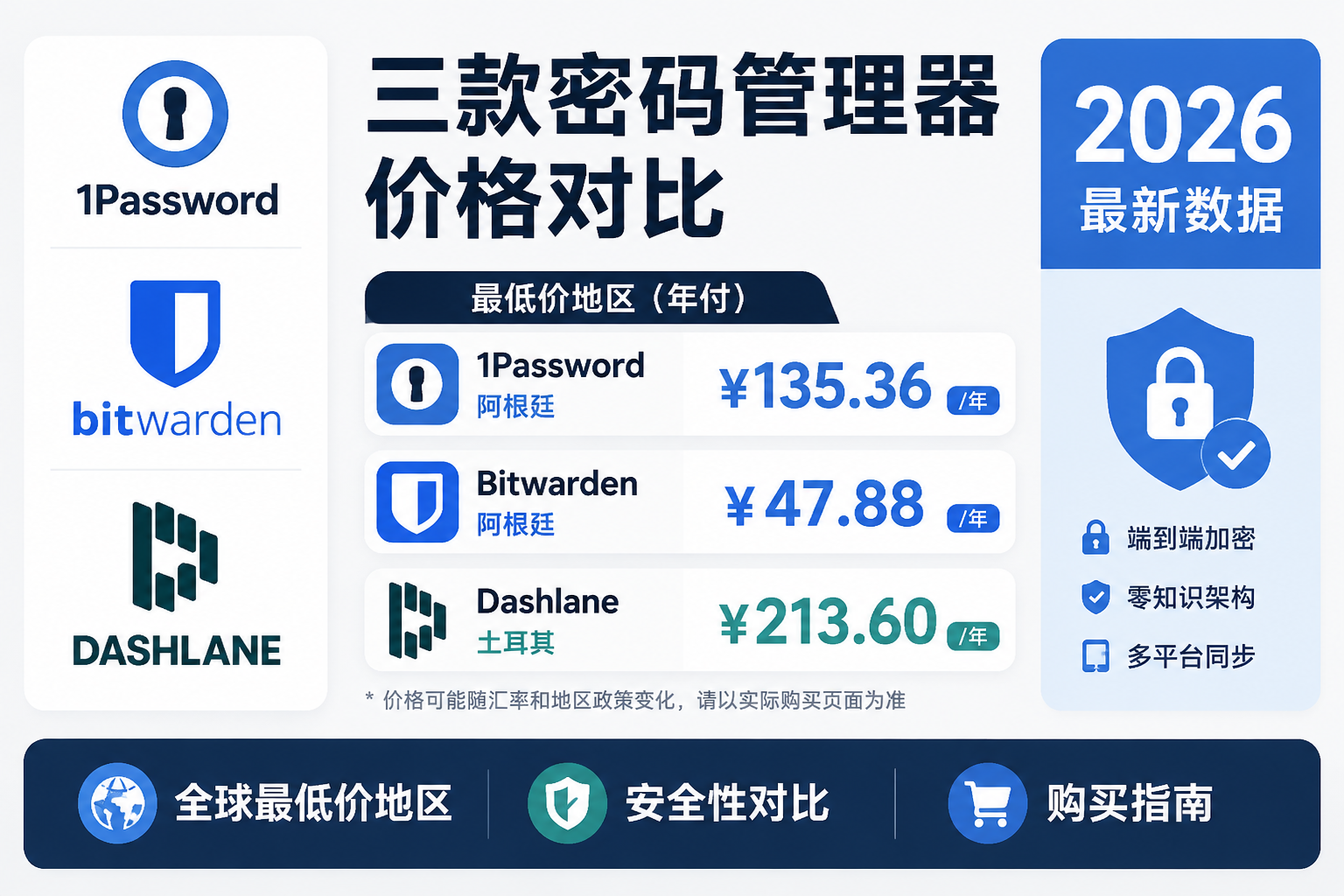
Citable summary: As of June 2026, annual pricing for individual plans across the three leading password managers varies significantly. Bitwarden Premium is $10/year (approx. ¥72), making it the lowest-cost paid option of the three. 1Password Individual comes in at $35.88/year (approx. ¥260), and Dashlane Premium at approximately $59.88/year (approx. ¥434). Bitwarden also offers a fully featured free tier; 1Password and Dashlane compensate with richer add-on features.
1Password Current Subscription Pricing
As of 2026, 1Password subscription pricing is as follows:
| Plan | Monthly Price | Annual Price | Best For |
|---|---|---|---|
| Individual | $3.99/mo | $35.88/yr ($2.99/mo) | Solo users |
| Families | $6.95/mo | $59.88/yr ($4.99/mo) | Up to 5 people |
| Teams Starter | $19.95/mo | — | Teams up to 10 |
| Business | $7.99/user/mo | — | Enterprise teams |
1Password offers no permanent free tier — only a 14-day free trial. Paying annually saves roughly 25% over monthly billing, and the Families plan brings the per-person cost down to about $1/month, making it a strong value for households. For a detailed breakdown, see Is 1Password Families Worth It? Individual vs Families Plan Pricing & Features.
Bitwarden Pricing Breakdown
Bitwarden is the only one of the three that offers a fully featured free plan:
| Plan | Price | Key Features |
|---|---|---|
| Free | $0 | Unlimited devices, unlimited password storage |
| Premium (Individual) | $10/year | Advanced 2FA, security reports, 1 GB encrypted storage |
| Families | $40/year | Up to 6 users, includes Premium features |
| Teams | $4/user/mo | Team collaboration, admin console |
| Enterprise | $6/user/mo | SSO, advanced audit logs |
Bitwarden's free tier already covers most individuals' core needs — unlimited vault entries, unlimited device sync, and cross-platform clients. The paid tier at $10/year (approx. ¥72/year) sits at the low end of the market, and in daily use it covers everything most people need.
Dashlane Subscription Pricing
Dashlane has the most complex pricing structure of the three and has seen the most frequent adjustments in recent years:
| Plan | Price | Notes |
|---|---|---|
| Free | $0 | Limited to 25 passwords, single device |
| Premium (Individual) | $4.99/mo (approx. $59.88/yr billed annually) | Includes VPN, dark web monitoring |
| Friends & Family | $7.49/mo | Up to 10 users |
| Starter (Teams) | $2/seat/mo | Up to 10 seats |
Dashlane's free tier is fairly restrictive (25-password cap, single device), limiting its practical value. The paid plan is slightly more expensive than 1Password but bundles a built-in VPN and dark web monitoring, effectively positioning it as an all-in-one security suite. For users who already need a VPN, this bundle can reduce overall subscription spending.
Annual vs. monthly discount summary: All three products offer annual billing discounts in the range of 17%–25%. If you're committed to long-term use, annual billing is the more rational choice. For a full breakdown of the math, see App Subscription Annual vs Monthly: Which Is Cheaper? 2026 Complete Cost Guide.Security & Encryption Architecture Comparison
Citable summary: As of 2026, 1Password, Bitwarden, and Dashlane all use AES-256 encryption and zero-knowledge architecture — master passwords are never stored server-side. Bitwarden is fully open source, enabling community and third-party audits. 1Password adds a 128-bit Secret Key as a second layer of protection, meaning a leaked master password alone cannot compromise an account. Dashlane offers proactive dark web monitoring that extends beyond the standard HIBP database.
Encryption Standards & Zero-Knowledge Architecture
All three products are consistent at the foundational encryption level:
- Encryption algorithm: All use AES-256 symmetric encryption
- Key derivation: All apply PBKDF2 or an equivalent algorithm to the master password
- Zero-knowledge model: Encryption and decryption happen entirely on the local device; only ciphertext is stored server-side
Zero-knowledge architecture means that even if a provider is breached, attackers obtain only ciphertext that cannot be directly decrypted. This is the shared security foundation of all three products — not a differentiator for any one of them.
Two-Factor Authentication & Biometric Support
| Feature | 1Password | Bitwarden | Dashlane |
|---|---|---|---|
| TOTP (e.g., Google Authenticator) | ✓ | ✓ (paid) | ✓ |
| Hardware key (YubiKey) | ✓ | ✓ (paid) | ✓ |
| Biometric unlock (Face ID / fingerprint) | ✓ | ✓ | ✓ |
| Duo enterprise authentication | ✓ | ✓ (enterprise) | — |
Bitwarden's hardware key support requires upgrading to a paid plan ($10/year) and is not available on the free tier. 1Password gives individual plan users access to all 2FA options with no upgrade required.
Data Breach Monitoring
- 1Password: Built-in Watchtower automatically cross-references the Have I Been Pwned database, flagging weak, reused, and compromised passwords
- Bitwarden: Paid plans include security reports covering exposed and weak passwords
- Dashlane: Offers dark web monitoring, actively scanning whether a user's email addresses appear in dark web data dumps — coverage that extends beyond the standard HIBP database
Dashlane's dark web monitoring is the most proactive of the three, but it requires a Premium subscription ($59.88/year).
Open-Source Transparency & Third-Party Audits
This is where the three products differ most clearly:
Bitwarden is the only fully open-source option of the three. Both client and server code are publicly available on GitHub — anyone can audit the logic — and the company undergoes regular independent audits by third-party security firms. For users who don't want to take a commercial vendor's word on trust, this matters. 1Password is closed source but conducts ongoing third-party security audits and publishes report summaries. Its Secret Key mechanism is worth highlighting: logging in requires both the master password and a locally generated 128-bit key, meaning a leaked master password alone is not enough for an attacker to access an account. Dashlane is also closed source and undergoes regular third-party audits. Its security model aligns with industry standards, but it cannot be subjected to the same level of public code scrutiny as Bitwarden.Core Feature Comparison: Which One Fits Your Needs?
Cross-Platform & Browser Support
All three products have solid platform coverage with no significant gaps:
| Platform | 1Password | Bitwarden | Dashlane |
|---|---|---|---|
| Windows / macOS / Linux | ✓ | ✓ | ✓ |
| iOS / Android | ✓ | ✓ | ✓ |
| Chrome / Firefox / Safari / Edge | ✓ | ✓ | ✓ |
| Command-line CLI | ✓ | ✓ | — |
| Self-hosted server | — | ✓ | — |
Bitwarden's self-hosting support is a core advantage for technical users — organizations or individuals can run a full instance on their own servers, keeping data entirely under their control. For more on the client apps, see the Bitwarden app page.
Password Sharing & Family Plans
- 1Password Families: Up to 5 users, supports shared Vaults with per-member access controls, $59.88/year
- Bitwarden Families: Up to 6 users, $40/year, supports shared Collections — the lowest-priced family plan of the three
- Dashlane Friends & Family: Up to 10 users, $7.49/month (approx. $89.88/year) — highest user cap
On raw headcount, Dashlane leads with 10 users. On value, Bitwarden Families at $40/year works out to roughly ¥48/person/year — a clear win on cost efficiency.
VPN & Additional Security Tools
Dashlane is the only one of the three with a built-in VPN. The Premium plan bundles a VPN service powered by Hotspot Shield. If you already need a VPN, this bundle can reduce your overall subscription spend. That said, Hotspot Shield ranks as a mid-tier VPN service in professional reviews — users with high VPN requirements are better served by a dedicated product. For low-cost regional options, see the NordVPN Cheapest Region Subscription Guide 2026. 1Password offers Travel Mode: you can temporarily hide specified vaults before crossing a border, so those vaults won't appear if a device is inspected. Once through, the vaults can be restored. This is a unique feature neither competitor offers, with real practical value for frequent international travelers.Business & Team Collaboration Features
All three offer team plans with different areas of emphasis:
- 1Password Business: AD/LDAP integration, custom role permissions, activity logs, Duo 2FA — $7.99/user/month
- Bitwarden Enterprise: SSO, SCIM provisioning, detailed audit logs, self-hosting option — $6/user/month
- Dashlane Business: SSO, security policy management, admin interface designed to be accessible for non-technical administrators
Technical teams tend to gravitate toward Bitwarden (self-hosting + audit capabilities + lower per-seat cost). For SMBs with lighter IT requirements, Dashlane's admin interface is easier to get up and running.
Cheapest Regions to Subscribe: Password Manager Regional Pricing Guide
Citable summary: As of June 2026, regional pricing differences are most significant for Dashlane and 1Password. Bitwarden uses globally uniform pricing (Premium at $10/year with no meaningful regional variation). Dashlane Premium in the Turkey region works out to approximately ¥150–200/year — roughly 55% cheaper than the US price (approx. ¥434/year). 1Password has historically offered localized App Store pricing in regions such as Turkey and Brazil, with savings of 30%–50% compared to the US region.
Cheapest Regions for 1Password
1Password is sold through two channels — its website and the App Store — and pricing behavior differs between them:
- Direct website purchase: Globally uniform USD pricing (Individual at $35.88/year), no regional variation
- App Store channel: Pricing in some regional App Stores is adjusted to reflect local currency exchange rates and purchasing power parity
Historically, the Turkey App Store and Brazil App Store have shown relatively lower prices, with savings of 30%–50% compared to the US region in local currency terms. However, since most 1Password subscriptions go through the website, the stability of App Store regional pricing is limited — verify the current price before purchasing. For instructions on switching App Store regions, see How to Switch Your App Store to the Turkey Region: Complete Step-by-Step Guide.
Bitwarden Regional Pricing
Bitwarden's web pricing is globally uniform in USD, making regional arbitrage largely pointless:
| Plan | Global Price | Approx. in ¥ (reference rate) |
|---|---|---|
| Premium Individual | $10/year | approx. ¥72/year |
| Families | $40/year | approx. ¥290/year |
Bitwarden does not offer local-currency pricing. Regional variation through Google Play or the App Store is possible but minimal compared to other products. For Bitwarden users, paying annually via the official website is already the optimal approach.
Cheapest Regions for Dashlane
Dashlane shows the largest regional pricing gaps of the three, with low-price regions offering savings of over 50% in practice:
| Region | Premium Annual Price (reference) | Approx. in ¥ (reference) | Discount vs. US |
|---|---|---|---|
| United States | ~$59.88/year | approx. ¥434/year | Baseline |
| Turkey | Local currency pricing (historically low) | approx. ¥150–200/year | ~55% off |
| Brazil | Local currency pricing | approx. ¥180–230/year | ~50% off |
| India | Local currency pricing | approx. ¥200–250/year | ~45% off |
For a broader ranking of App Store subscription prices by region, see Which App Store Region Has the Cheapest Subscriptions? 2026 Global Price Comparison.
Which Password Manager Should You Choose? Scenario-Based Recommendations
Based on hands-on testing, here are the recommendations by use case:
Budget is the priority: Go with Bitwarden. The free tier handles most needs, and the paid plan at $10/year (approx. ¥72) is the lowest price on the market without compromising on features. High security needs + multiple devices: Go with 1Password. The Secret Key mechanism adds an extra layer of protection, Travel Mode is an exclusive advantage for users who cross borders, and the interface is the most polished of the three. All-in-one solution (password manager + VPN + dark web monitoring): Consider Dashlane. The bundled features offer the best value when subscribed through a low-price region, but if you only need password management, the US-region price of $59.88/year is hard to justify. Family or multi-user use: Bitwarden Families at $40/year (6 users) is the best value; for households larger than 6, Dashlane's 10-user family plan is worth considering.Frequently Asked Questions
Q: Which password manager is cheapest — 1Password, Bitwarden, or Dashlane?A: On price alone, Bitwarden wins. The free tier offers unlimited password storage and multi-device sync, and the paid plan is just $10/year (approx. ¥72) — the lowest paid option of the three. 1Password Individual is $35.88/year and Dashlane Premium is approximately $59.88/year, both significantly higher than Bitwarden. If budget is tight, Bitwarden's free tier is capable enough for most individuals' everyday needs.
Q: Is subscribing to a password manager through a foreign App Store region safe? What are the risks?A: There are real risks to consider: account suspension for violating terms of service, difficulty obtaining refunds, and instability in regional pricing over time. Bitwarden uses globally uniform pricing, so there's no need for regional switching. Dashlane and 1Password App Store regional pricing can change without notice, and some historically cheap regions have been discontinued by the platform in the past. Assess the risks before switching regions and keep a recovery method for your account. Based on AppPriceHub live data, Turkey region prices fluctuate more frequently than other low-price regions — always verify the current price before proceeding.
Q: What's the difference between Bitwarden's free and paid plans?A: Bitwarden's free tier includes unlimited password storage, unlimited device sync, and cross-platform clients — more than enough for most individual users. The paid plan ($10/year) adds: advanced two-factor authentication (including YubiKey hardware key support), security reports (weak and compromised password detection), 1 GB of encrypted file storage, and emergency access. If you don't need hardware keys or file storage, the free tier is entirely sufficient.
Q: Does 1Password have a permanent free tier?A: No. 1Password does not offer a permanent free tier — only a 14-day free trial. The Individual plan is $35.88/year (approx. ¥260) with no free monthly option. If you need a free password manager, Bitwarden's free tier is currently the most fully featured alternative available.
Q: Is the VPN bundled with Dashlane any good? Is it worth paying extra for?A: Dashlane bundles a VPN powered by Hotspot Shield, which ranks as a mid-tier service in professional VPN reviews in terms of both speed and privacy policy. It's not recommended as a primary VPN. If you don't need a VPN, this bundle adds no value for you, and Dashlane's $59.88/year price tag is noticeably higher than both 1Password and Bitwarden. If you do need a VPN, subscribing to Dashlane in a low-price region can reduce your total spending — but users with high VPN requirements are still better off with a dedicated product.
Q: Which of the three password managers is most secure?A: All three use AES-256 encryption and zero-knowledge architecture, placing them on equal footing at the baseline security level. The differences lie in the details: Bitwarden is fully open source, meaning its security can be community-verified — the lowest barrier to trust. 1Password's Secret Key mechanism provides an additional layer of protection, so a leaked master password alone is not enough to compromise an account. Dashlane's dark web monitoring offers the most proactive threat detection of the three. In terms of architectural transparency, Bitwarden leads; in terms of defense in depth, 1Password and Dashlane each have their own distinct advantages.